pacomillet
-
Posts
1 -
Joined
-
Last visited
pacomillet's Achievements

Newbie (1/14)
0
Reputation
-
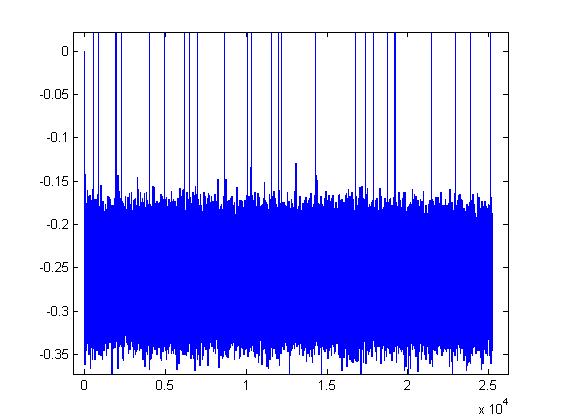
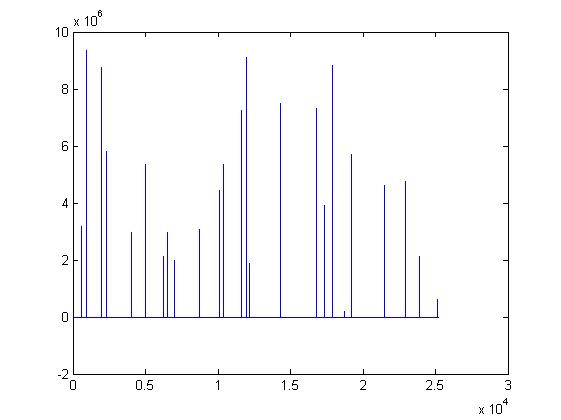
Hi, I have similar problem. I'm capturing data using fscanf in Matlab from arduino UNO and MPU6050 and I'm saving data during several hours and get a lot of spikes. You can see the images attached. (Axis X is in seconds) some lines in my arduino code : #include "I2Cdev.h" #include "MPU6050.h" .... void setup() { .... #if I2CDEV_IMPLEMENTATION == I2CDEV_ARDUINO_WIRE Wire.begin(); #elif I2CDEV_IMPLEMENTATION == I2CDEV_BUILTIN_FASTWIRE Fastwire::setup(400, true); #endif Serial.begin(115200); .... //config MPU6050 writeByte(MPU6050_ADDRESS, PWR_MGMT_1, 0x00); writeByte(MPU6050_ADDRESS, CONFIG, 0x01); // Set Low Pass Filter to 188 Hz (1 KHz) writeByte(MPU6050_ADDRESS, SMPLRT_DIV, 0x09); void loop() { uint32_t deltat = millis() - count; if(deltat >0.01) { getdataIMU(); Serial.print(ax,8); //Serial.print(millis()); Serial.print("\t"); // Use this character in MATLAB Serial.print(ay,8); Serial.print("\t"); // Use this character in MATLAB Serial.print(az,8); Serial.print("\t"); // Use this character in MATLAB Serial.print(gx,8); Serial.print("\t"); // Use this character in MATLAB Serial.print(gy,8); Serial.print("\t"); // Use this character in MATLAB Serial.print(gz,8); Serial.print("\t"); // Use this character in MATLAB Serial.println(temperature,8); count = millis(); } Matlab code: s = serial('COM4'); set(s, 'InputBufferSize', 16384); set(s, 'FlowControl', 'none'); set(s, 'BaudRate', 115200); set(s, 'Parity', 'none'); set(s, 'DataBits', 8); set(s, 'StopBit', 1); %set(s, 'Timeout',4); fopen(s); s.ReadAsyncMode = 'continuous'; readasync(s); .... sSerialData = fscanf(s); %read sensor t = strsplit(sSerialData,'\t'); % same character as the Arduino code mData(i,1) = str2double(t(1)); .... Why this occurs? some idea? Thank you very much!